For Business Users
Why MIFY for Business?
Section titled “Why MIFY for Business?”MIFY gives your organization controlled, auditable AI automation. Unlike standalone AI tools, MIFY provides approval gates, audit trails, cost controls, and team management — everything you need to deploy AI responsibly.
Templates for Business Use Cases
Section titled “Templates for Business Use Cases”Start with a pre-built template. No need to build from scratch:
| Business Need | Templates to Try | What They Do |
|---|---|---|
| Customer support | LLM templates (12) | Draft AI responses, classify tickets, extract info |
| Report generation | RAG templates (9) | Pull data from documents, generate summaries |
| Approval workflows | HITL templates (8) | AI drafts → human reviews → approved or revised |
| Data processing | Logic templates (17) | Route, filter, batch process business data |
| Email automation | Enterprise templates | Auto-respond, classify, schedule follow-ups |
| Scheduling | Enterprise templates | Check availability, book meetings, send reminders |
Browse templates at /templates → click any one to preview → “Use Template” to start.
Compliance and Audit
Section titled “Compliance and Audit”Full Audit Trail
Section titled “Full Audit Trail”Every workflow execution is logged:
- Who ran it, when, with what inputs
- Which AI model was used and what it produced
- Whether a human approved the output
- Complete history for regulatory review
Export audit logs (JSON/CSV) for compliance reporting. Category-specific retention: authentication logs 365 days, security events up to 7 years.
Approval Workflows (HITL)
Section titled “Approval Workflows (HITL)”Insert human checkpoints in any workflow:
- AI drafts a customer response → manager reviews → approved → sent
- AI extracts contract terms → legal reviews → approved → saved
- AI generates a report → director reviews → approved → distributed
Approvals appear in each reviewer’s Inbox with SLA timers. If nobody responds in time, the system escalates.
Policy Engine
Section titled “Policy Engine”Define rules for what AI can and cannot do:
- Deny-takes-precedence across organization, workspace, and global levels
- Conditions: require_approval, time_window, rate_limit, data_filter
- Automatic data classification: public, internal, confidential, restricted
- DLP patterns detect sensitive data (SSNs, credit cards, API keys)
Execution History
Section titled “Execution History”Compare workflow runs side-by-side. Replay past executions. Generate support bundles for debugging.
Cost Control
Section titled “Cost Control”| Control | What It Does |
|---|---|
| Usage tracking | Per-user, per-team, per-workflow cost tracking (/settings/usage) |
| Budget caps | Daily, weekly, monthly spending limits |
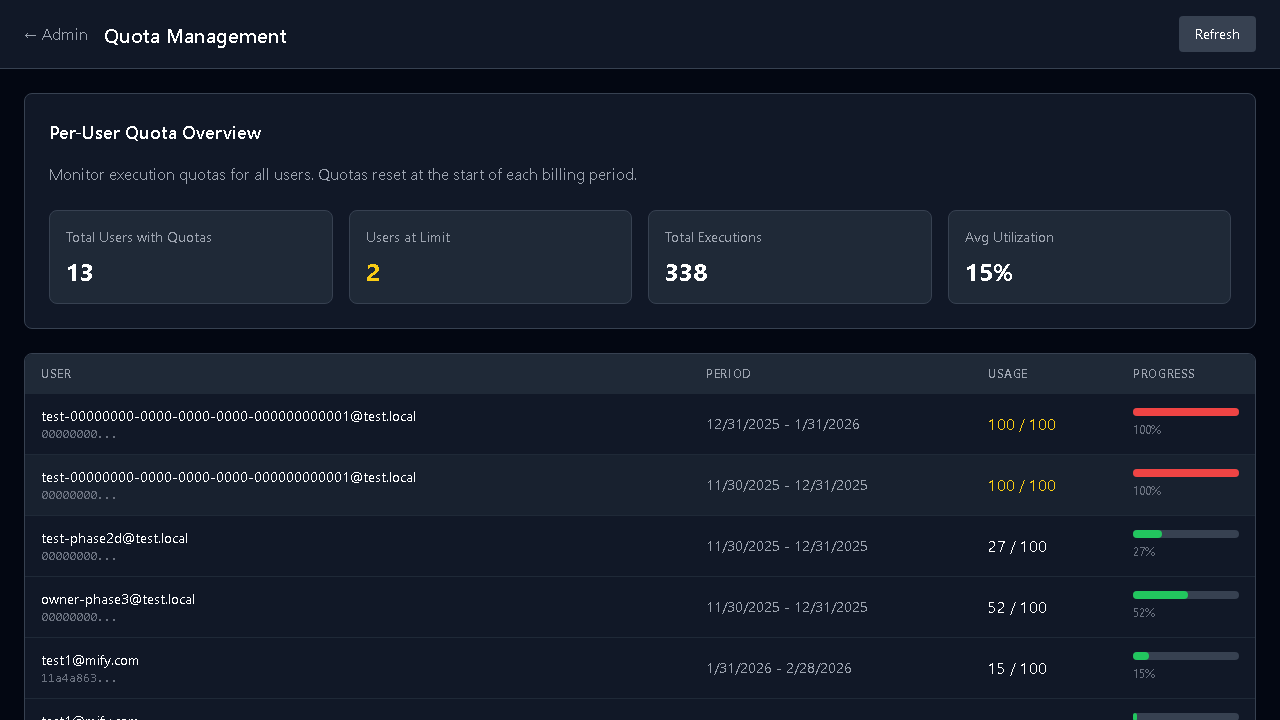
| Quota management | Limit AI calls by user tier (free/starter/pro/enterprise) |
| Provider tiers | Choose Fast (cheap), Balanced, or Accurate (quality) per workflow |
| Cost estimation | See estimated cost before running expensive workflows |
Admin usage dashboard at /admin/usage.
Team Management (30+ Admin Pages)
Section titled “Team Management (30+ Admin Pages)”| Admin Area | What You Control | Path |
|---|---|---|
| Quotas | Usage limits per user and team | /admin/quota |
| Audit | Browse and export execution history | /admin/audit |
| Policy | Rules for what AI can do | /admin/policy |
| Identity | Manage users and roles | /admin/identity |
| Notifications | Configure alert rules and channels | /admin/notifications |
| Analytics | Usage patterns and cost analysis | /admin/analytics |
| Scheduling | Recurring automated workflows | /admin/scheduling |
| Health | System health monitoring | /admin/health |
| Services | Service availability and status | /admin/services |
| Plugins | Manage installed extensions | /admin/plugins |
| Webhooks | External integrations | /admin/webhooks |
| Agents | AI agent management | /admin/agents |
| Approvals | Pending approval queue | /admin/approvals |
Security Controls
Section titled “Security Controls”| Feature | What It Provides |
|---|---|
| SSO/SCIM | Integrate with your identity provider |
| Workspace isolation | Separate teams with independent settings |
| Role-based access | Admins, users, and experts with different permissions |
| Credential encryption | All API keys encrypted at rest |
| Data classification | Automatic detection of sensitive data |
AI Provider Management
Section titled “AI Provider Management”108+ AI providers managed from one place:
- Provider packs — bundle configs as Fast/Balanced/Accurate tiers
- LiteLLM admin — centralized provider management at
/admin/litellm - Cost tracking — per-provider and per-model usage data
- BYOK — users bring their own API keys (encrypted, workspace-scoped)
Knowledge Bases
Section titled “Knowledge Bases”Upload company documents and let anyone ask questions:
- Supports PDF, Word, HTML, CSV, Markdown, JSON, Text
- AI searches across all documents and gives sourced answers
- Manage at
/knowledge
Batch Processing
Section titled “Batch Processing”Run workflows at scale:
- Submit batch jobs with concurrency control
- Pause, resume, or cancel batches
- Stop-on-error to halt on first failure
Scheduling
Section titled “Scheduling”Set up recurring automated workflows:
- Cron-based scheduling with timezone support
- Monitor results and get notified on failures
Chat Widget
Section titled “Chat Widget”Embed an AI-powered chat on your website:
- Configure at
/settings/embed - Backed by your workflows and knowledge bases
- Customizable appearance and position
Hiring Experts
Section titled “Hiring Experts”Need help building workflows? Hire verified experts:
- Browse experts at
/experts - Post jobs at
/jobs/create - Review proposals and hire
- Pay through escrow (safe for both sides)
Notifications
Section titled “Notifications”5 delivery channels: email, Slack, webhook, in-app, SMS. Configure routing by category and priority at /settings/notifications.
Messaging
Section titled “Messaging”Direct messaging with team members and external experts at /messages. Unified inbox at /inbox.
Getting Started for Business
Section titled “Getting Started for Business”- Try templates — browse at
/templates, find one for your use case, click “Use Template” - Pilot one workflow — pick one team and one process to automate
- Set up controls — configure quotas, policies, and approval workflows
- Measure ROI — track time saved and cost per execution at
/admin/analytics - Scale — add teams and workflows as value is proven